
Setup Guide
Follow the guides below to set up Recommended apps.
IPTV Smarters Pro/Lite Setup Guide (Smart TV users can try this.)
- Download and Install IPTV Smarters Lite:
- Download the app from the App Store (iOS) or For Android or Smart Tv
- Open the App:
- Once installed, open the app and select the device you are on. Are you on TV Or Mobile?

- Then Select Login with Xtream code Api option.

- Once installed, open the app and select the device you are on. Are you on TV Or Mobile?
- Add a New User:
- Xtream Codes API, Now Proceed to enter the Username, password and port Url Sent to you by me.

- Xtream Codes API, Now Proceed to enter the Username, password and port Url Sent to you by me.
- Login:
- After entering the details, click "Add User" and then click download to load up the TV,Movies And Series Playlist

- After entering the details, click "Add User" and then click download to load up the TV,Movies And Series Playlist
- Explore and Enjoy:
- Congratulations🫡🫡Now Navigate through the app to explore live TV, movies, series, and other contents. Enjoy
Televizo IPTV setup guide(For Android box/android phones -not smart TVs)
- Download and Install Televizo iptv App:
- Download the app For Android Only.
- Launch the Televizo IPTV on your device.
- Click on the Create playlist option provided on its main screen and
- Click on Continue.
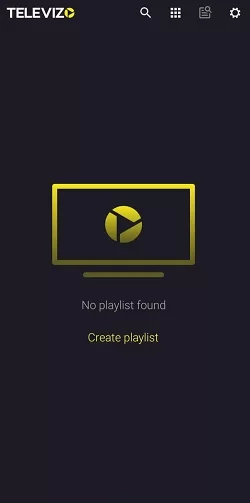
- In the following screen, select either the New M3U playlist or New Xtream Codes playlist depending on your IPTV provider.
NB: Select m3u Playlist Option for mobile and request for m3u link for a smoother setup, But if on Tv, Select xtream Code Option and proceed with the next step. - Then, enter your IPTV Credentials along with your Playlist name(Your Name Or Anthing), Username, Password, etc.
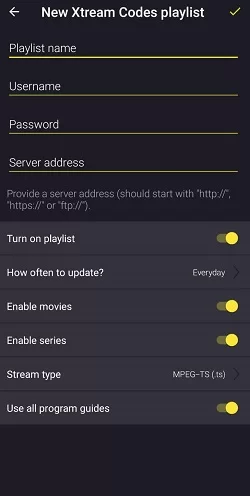
- Click on the Tick mark provided at the top-right and complete the process.
6. After this, you can start streaming IPTV content using Televizo.
Explore and Enjoy🫡🫡
Tivimate Setup Guide For Android box/tv (not smart TVs)
Step 1: First of all download and install app from TIVIMATE on Your downloader.
Step 2: After open Tivimate click on “ADD PLAYLIST“.

Step 3: Click on “Xtream Codes login” and them Next.

Step 4: In this step you need to add Server address, Username and Password which will be sent to you.
If you want to have VODs too(Recommended), mark “Include VOD” .

Go on and the channels will appear after a while.
Download Links
Download Genexsis IPTV Apps for All Devices
⬇️Android Apps⬇️
⬇️ios Apps⬇️
For Samsung TV
Step 1 : Press the Smart Hub button from your remote.
Step 2 : Search for the IPTV Smarters Pro to install.
Step 3 : Log in the Application with your subscription details i.e. Username, Password, Portal URL.
For LG Smart TV
Step 1 : Press the Home button on the remote & Go to LG Content Store.
Step 2 : Search for the IPTV Smarters Pro to install.
Step 3 : Log in the Application with your subscription details i.e. Username, Password, Portal URL.
The Premium Version Features are not available for Samsung/LG
 Get a Trial now.
